

systemctl command
In Red Hat Enterprise Linux 7, process ID 1 is systemd, the new init system. A few features provided by systemd include:
• Parallelization capabilities, which increase the boot speed of a system.
• On-demand starting of daemons without requiring a separate service.
• Automatic service dependency management, which can prevent long timeouts, starting a network service when the network is not available.
• A method of tracking related processes to gather by using Linux control groups.
Service states using systemctl command
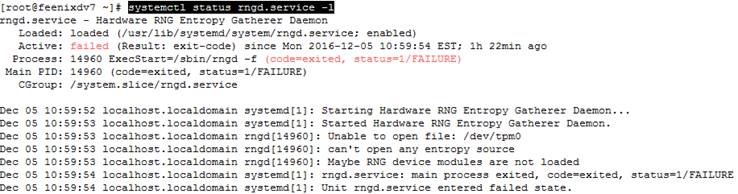
The status of a service can be viewed with systemctl status name.

Investigate any units which are in a failed or maintenance state. Optionally, add the -l option to show the full output.
Enable or disable service (chkconfig use in lower version of RHEL)

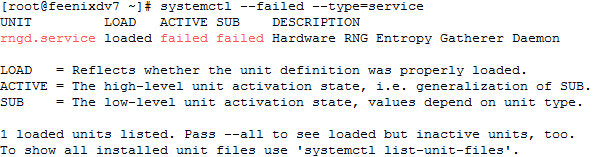
View only failed services.
View the enabled and dis abled settings for all units. Optionally, limit the type of unit.

Start/stop/restart Services
Status

Stop

Start

Restart/reload

List all dependency of ant services

Masking services
At time s, a system may have conflicting services installed. For example, there are multiple methods to manage networks (network and Network Manager) and firewalls (iptables and firewalld). To prevent an admin iterator from accident tally starting a service, that service may be masked. Masking will create a link in the configuration directories so that if the service is started, nothing will happen.

Un-Masking services

