
How to set default target (default runlevel)
The conventional way used to change runlevel using /etc/inittab has become obsolete with Redhat Enterprise Linux version 7. As a result any Linux system using systemd system management daemon now relies on systemctl command to change runlevel or to be more precise to change the target. As a result any edits of /etc/inittab file will not take effect on RHEL 7. The term runlevel still exists on RHEL 7 and we cat check current runlevel using runlevel command: To list the predefined systemd run level target units :
List all currently loaded targets we can use the following command:

Comparison of SysV Run Levels and Target Units
The table below shows the system-state targets which are equivalents of run-levels
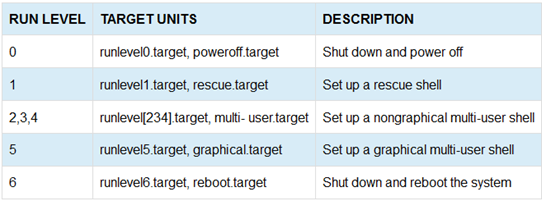

The default target unit is represented by the /etc/systemd/system/default.target file. This file is a symbolic link to the default target unit file currently set.
# ls -l /etc/systemd/system/default.targetlrwxrwxrwx. 1 root root 40 Oct 11 02:02 /etc/systemd/system/default.target -> /usr/lib/systemd/system/graphical.target Use the runlevel command to view the SysV runlevel.
# runlevelN 5 How to change run level or set run level We have mainly these run level.· poweroff.target
· rescue.target
· multi-user.target
· reboot.target
In RHEL 7 we have “default” pointer who decide OS boot in which run level so 1st check the default value.


Then set run level. In my example I set run level to “multi-user.target”

Note that changing the default target unit removes the existing default.target symbolic link and re-creates the symbolic link, which points to the new default target unit file.
Switch to particular run level.
This command quickly boot in “default” run level if currently not in.
# systemctl default
For switch particular run level from current command prompt (like #init 5 command).

