

Centralized Secure Storage using iSCSI

iSCSI is a block level Protocol for sharing RAW Storage Devices over TCP/IP Networks, Sharing and accessing Storage over iSCSI, can be used with existing IP and Ethernet networks such as NICs, Switched, Routers etc. iSCSI target is a remote hard disk presented from an remote iSCSI server (or) target.
Features of iSCSI Target
- Possible to run several iSCSI targets on a single machine.
- A single machine making multiple iscsi target available on the iSCSI SAN
- The target is the Storage and makes it available for initiator (Client) over the network
- These Storage’s are Pooled together to make available to the network is iSCSI LUNs (Logical Unit Number).
- iSCSI supports multiple connections within the same session
- iSCSI initiator discover the targets in network then authenticating and login with LUNs, to get the remote storage locally.
- We can Install any Operating systems in those locally mounted LUNs as what we used to install in our Base systems.
Master Server Setup
- CentOS release 6.1 (Final)
- iSCSI Target IP – 192.168.0.20
- Ports Used : TCP 860, 3260
- Configuration file : /etc/tgt/targets.conf
Installing iSCSI Target
[root@feenix ~]# yum install scsi-target-utils –y
Start the iSCSI Service
[root@feenix ~]# /etc/init.d/tgtd start
Configure it to start Automatically
[root@feenix ~]# chkconfig tgtd on
We need to add iptables rules for iSCSI if there is iptables deployed in your target Server. First, find the Port number of iscsi target using following netstat command.
[root@feenix ~]# netstat -tulnp | grep tgtd
LUN is a Logical Unit Number, which shared from the iSCSI Storage Server. The Physical drive of iSCSI target server shares its drive to initiator over TCP/IP network. A Collection of drives called LUNs to form a large storage as SAN (Storage Area Network). In real environment LUNs are defined in LVM, if so it can be expandable as per space requirements.


Creating LUNs using LVM in iSCSI Target Server
1st we need to create LVM partition then over the LVM LUN is created. For how to create LVM partition see the article (LVM).
Here we have bellow partition list.


And bellow is “lvdisply” output.


Define LUNs in Target Server
Edit Target configuration file located at ‘/etc/tgt/targets.conf’
[root@feenix ~]# vi /etc/tgt/targets.conf
Put bellow lines in bottom of file.

Here in target you can put any name, in “backing-store” is LV partition full path.
Reload the configuration by starting tgd service

Next verify the available LUNs using the following command.
[root@feenix ~]# tgtadm –mode target –op show

Client Setup
In Client side, we need to install the package ‘iSCSI-initiator-utils‘.
[root@feenix ~]# yum list installed iSCSI-initiator-utils

After installing the package, we need to discover the share from Target server. The client side commands little hard to remember, so we can use man page to get the list of commands which required to run.
[root@feenix ~]# man iscsiadm
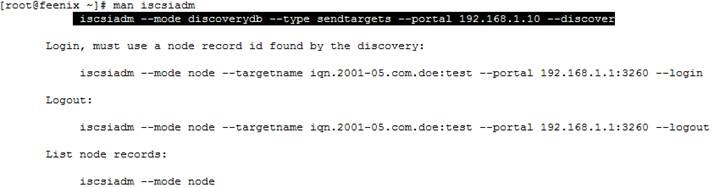
So for discover we use bellow command ( replace IP )
[root@feenix ~]# iscsiadm --mode discoverydb --type sendtargets --portal 192.168.0.20 –discover


To log-in use the below command to attach the LUN to our local System, this will authenticate with target server and allow us to log-in into LUN.
[root@feenix ~]# iscsiadm --mode node --targetname iqn.2014-07.com.feenixdv:tgt1 --portal 192.168.0.20:3260 --login
Logging in to [iface: default, target: iqn.2014-07.com.feenixdv:tgt1, portal: 192.168.0.20,3260]
Login to [iface: default, target: iqn.2014-07.com.feenixdv:tgt1, portal: 192.168.0.20,3260] successful.
Note: Use the login command and replace login with logout at end of command to disconnect.
After login to the LUN, list the records of Node using.
[root@feenix ~]# iscsiadm --mode node
Display all data of a particular node.
[root@feenix ~]# iscsiadm –mode node –targetname iqn.2014-07.com.feenixdv:tgt1 –portal 192.168.0.20:3260

Then list the drive using, fdisk
[root@feenix ~]# fdisk –l

For using these disk 1st need to create partition then make FS and after that mount these partition.
